3D Exercise 185


CATICS 3D02-08 – 3D CAD Modeling Exercise
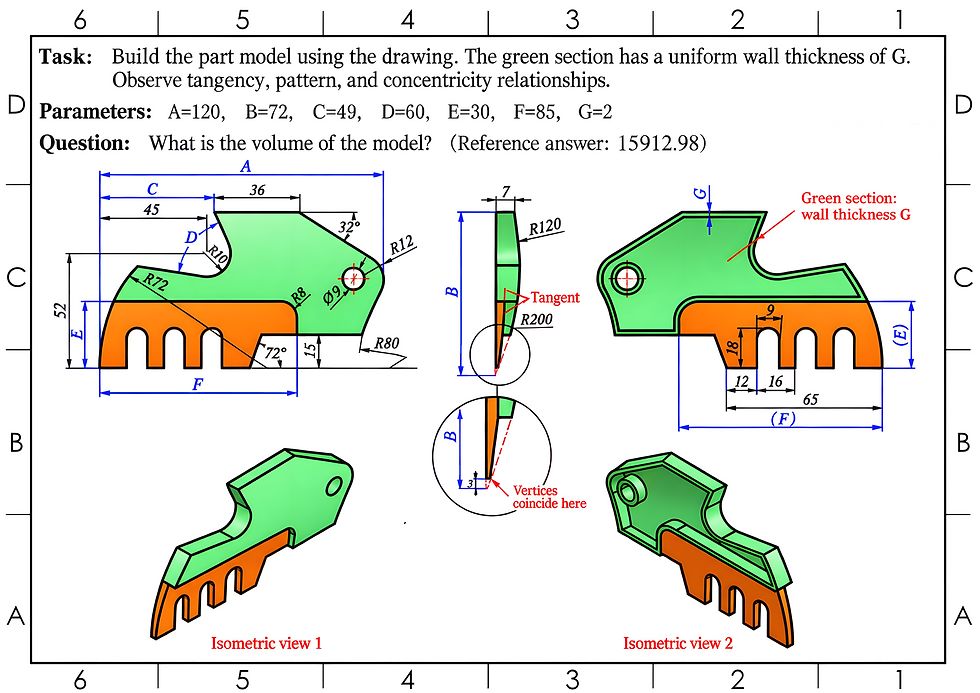
Improve your 3D CAD modeling skills with the CATICS 3D02-08 exercise. This mechanical modeling challenge is designed to help you practice reading technical drawings, interpreting dimensions, creating accurate sketches, and transforming a 2D drawing into a complete 3D model.
The exercise can be recreated in different CAD software, making it useful for students, mechanical designers, engineers, and anyone looking to improve their parametric modeling skills.
Use the technical drawing below as a reference and try to complete the model before watching the tutorial.
Features used to make this exercise:
In this CAD tutorial we'll use the features:
Extrude: Creates a 3D feature by extending a sketch profile along a specified direction and distance.
Shell: Creates a hollow body by removing selected faces and applying a specified wall thickness.
All dimensions are in mm/g/s/ISO
2D Sketch
Tip: Subscribe to the channel for more tutorials like this.
Tutorial In Autodesk Fusion: https://youtu.be/VxuKP0PZAcs
Tutorial in FreeCAD:


Comments