3D Exercise 193

Updated: 15 hours ago

Features used to make this exercise:
In this CAD tutorial we'll use the features:
Extrude: Creates a 3D feature by extending a sketch profile along a specified direction and distance.
Sweep: Creates a 3D feature by moving a sketch profile along a selected path.
Revolve: Creates a 3D feature by rotating a sketch profile around a selected axis.
Fillet: Rounds sharp edges by applying a specified radius, creating a smooth transition between adjacent faces.
All dimensions are in mm/g/s/ISO
2D Sketch
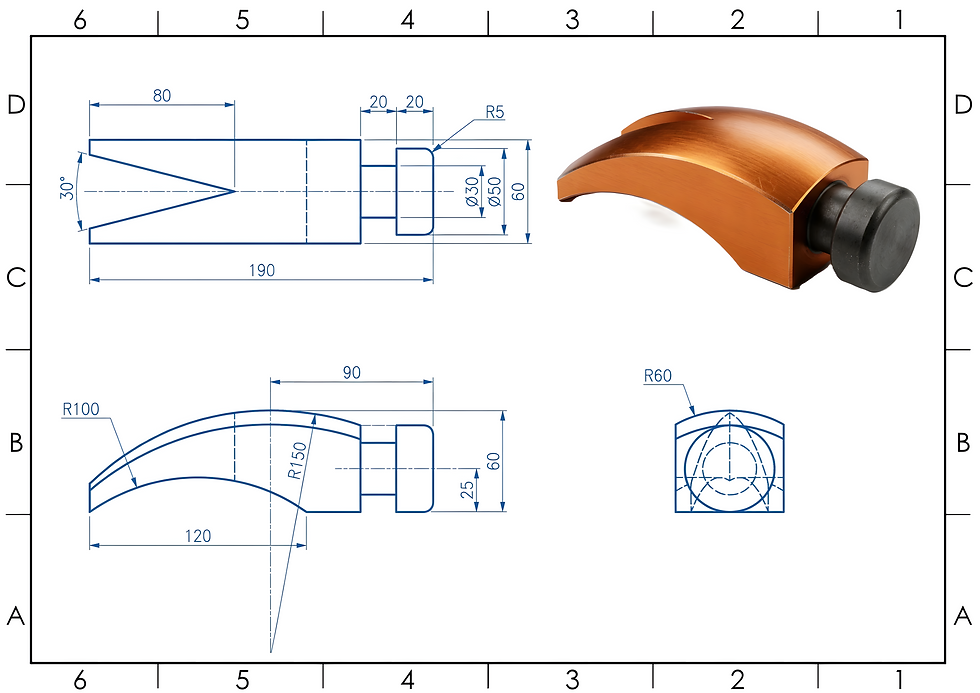
Tip: Subscribe to the channel for more tutorials like this.
Tutorial In Autodesk Fusion: https://youtu.be/aRHcSj7i-3Q
Tutorial in FreeCAD:


Comments