3D Exercise 24

Updated: Aug 31
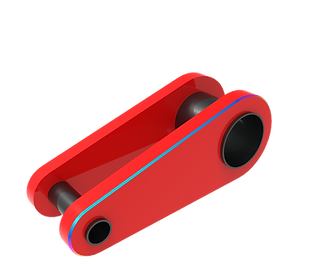
In this CAD tutorial we'll use the features:
Extrude with Offset
The Extrude command is the fundamental tool for transforming a 2D sketch into a 3D solid. The Offset option within this command allows the extrusion to start at a specified distance from the original sketch plane, rather than directly on it.
This is useful for creating features that need to float or start deeper within a part without having to create a separate construction plane.
You define the offset distance first, and then the depth (Distance) of the actual extrusion.
Chamfer
The Chamfer command is used to modify an edge by creating a flat, angled surface instead of a rounded curve (like a fillet). It's often used to break a sharp edge for aesthetics, safety, or to ease part assembly. You can define the chamfer by:
Equal Distance: Creates a 45-degree angle (Distance x Distance).
Two Distances: Allows for unequal dimensions on the faces.
Distance and Angle.
Mirror
The Mirror command is used to create a symmetrical copy of a feature, body, or component.
It's a powerful tool for designing symmetrical parts, saving time by letting you model only one half and then mirroring it.
You select the object to be copied and the Mirror Plane/Face to define the plane of symmetry.
All dimensions are in mm/g/s/ISO
3D Sketch

Exercise 24 - 3D practice drawing for all CAD software ( AutoCAD, SolidWorks, 3DS Max, Autodesk Inventor, Fusion 360, CATIA, Creo Parametric, SolidEdge etc.)
Tip: Subscribe to the channel for more tutorials like this.
Tutorial In Autodesk Fusion: https://youtu.be/A6drBVnmMdY
Tutorial in Solidworks : https://youtu.be/SNJWZgNhpXw
Tutorial in Onshape: https://youtu.be/YOzw5M8T3P4
Tutorial in Freecad: https://youtu.be/HOcvnowcj6I
Tutorial in Autodesk Inventor: https://youtu.be/EUz1hbQDat4


Comments