3D Exercise 28

Updated: Aug 31

In this CAD tutorial we'll use the features:
Extrude
Extrude is the most fundamental command for turning a 2D sketch into a 3D solid. It works by extending a sketch profile in a straight line, either to add material ("join") or to remove material ("cut").
Hole
The Hole command is a specialized tool for creating different types of cylindrical cuts in a part. It offers options for industry-standard holes (like tapped/threaded, clearance, or countersunk) and is faster and more accurate than using a simple extruded cut for these features.
Offset Plane
An Offset Plane is a construction tool used to create a new work plane parallel to an existing face or plane at a specific distance. It is essential for creating new sketches or features in a location where there is no existing geometry to sketch on.
Chamfer
The Chamfer command is used to modify an edge by creating a flat, angled surface instead of a rounded curve (like a fillet). It's used for aesthetics, to break a sharp corner, or to ease assembly.
Loft
The Loft command creates a 3D shape by blending two or more sketch profiles (or a profile and a point) that are on different planes. It is used to create complex, organic shapes that smoothly transition from one cross-section to another, such as a vase or a boat hull.
All dimensions are in mm/g/s/ISO
3D Sketch
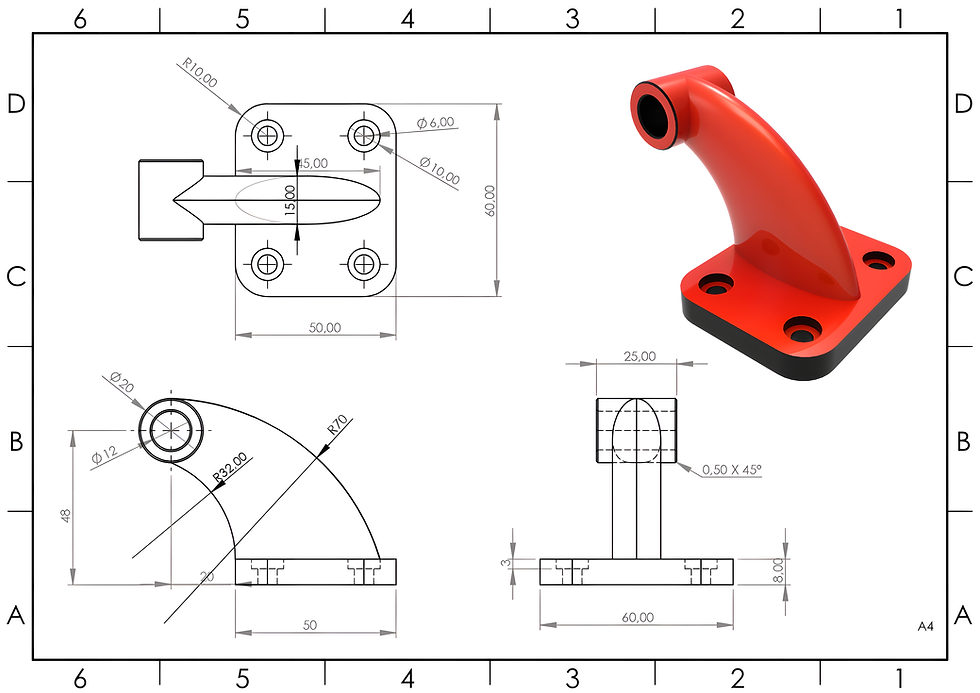
Exercise 28 - 3D practice drawing for all CAD software ( AutoCAD, SolidWorks, 3DS Max, Autodesk Inventor, Fusion 360, CATIA, Creo Parametric, SolidEdge etc.)
Tip: Subscribe to the channel for more tutorials like this.
Tutorial In Autodesk Fusion: https://youtu.be/MyWLPvd8408
Tutorial in Onshape: https://youtu.be/fPjDgWGHQ0E
Tutorial in Solidworks:
Tutorial in Autodesk Inventor: https://youtu.be/x0nT5qoLEWU
Tutorial in Freecad: https://youtu.be/liak7VW-dCU


Comments