3D Exercise 75
- Breno Cruz

- Dec 23, 2025
- 2 min read

In this CAD tutorial we'll use the features:
1. Pipe
Definition: A productivity tool that instantly creates a tube or rod along a sketch path. How it works: It replaces the slow process of "Sketch Circle + Sweep." You simply draw a single line (straight or curved). Then, select the Pipe tool and click that line. You can choose:
Section: Circle, Square, or Triangle.
Hollow: Check this box to make it a tube (like a straw) instead of a solid rod. Best for: Roll cages, furniture frames (chairs/tables), exhaust manifolds, or the rim of a steering wheel.
2. Extrude
Definition: The standard tool for creating solid geometry from a sketch. How it works: You select a profile and give it thickness. Best for: Creating the rigid parts that connect to your pipes, such as a central hub, a mounting plate, or a seat base.
3. Circular Pattern
Definition: Duplicates features or bodies in a circle around a center axis. How it works: You model one instance of an object (like one leg of a stool or one spoke of a wheel). Then:
Select the Object (the Pipe leg).
Select the Axis (the center vertical line).
Enter the Quantity (e.g., 3 or 4). Best for: Radial symmetry. It saves you from drawing and piping every single leg manually.
4. Chamfer
Definition: Cuts a flat, angled bevel on an edge. How it works: Removes the corner at a 45° angle (usually). Best for: The ends of the pipes or tubes. If a pipe is meant to be welded or inserted into a socket, a chamfer helps it align and fit.
5. Fillet
Definition: Rounds off sharp edges. How it works: Creates a smooth radius. Best for:
Weld Beads: Adding a fillet where a Pipe meets an Extruded plate simulates a weld.
Touch: Removing sharpness from the extruded parts so they don't scratch the user.
All dimensions are in mm/g/s/ISO
3D Sketch
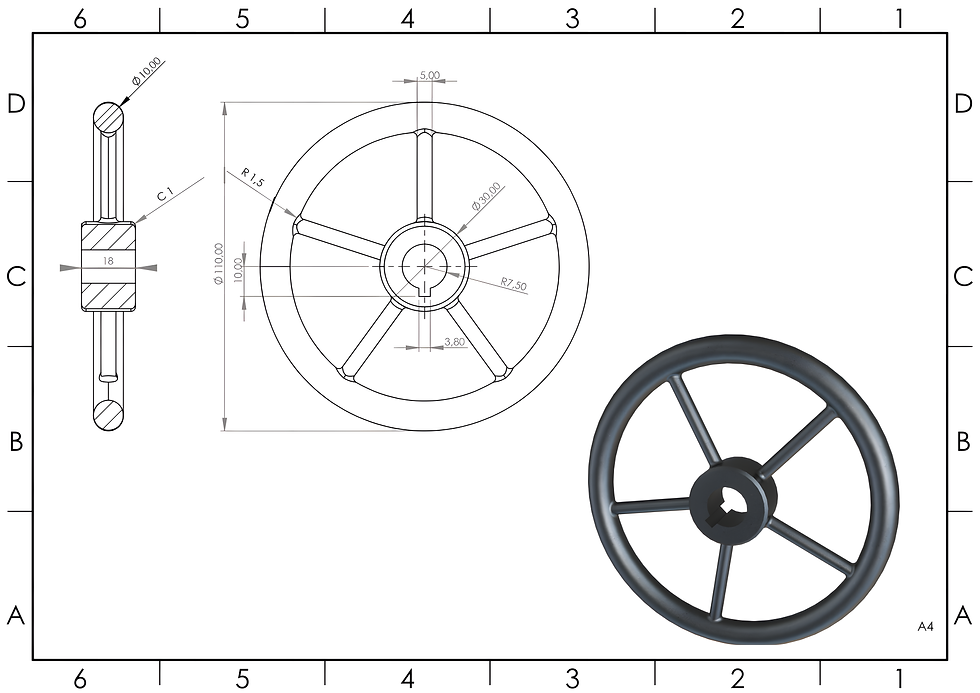
Exercise 75 - 3D practice drawing for all CAD software ( AutoCAD, SolidWorks, 3DS Max, Autodesk Inventor, Fusion 360, CATIA, Creo Parametric, SolidEdge etc.)
Tip: Subscribe to the channel for more tutorials like this.
Tutorial In Autodesk Fusion: https://youtu.be/3G-3X8LDgqw


Comments