3D Exercise 84


In this CAD tutorial we'll use the features:
1. Extrude
Definition: The foundation tool. How it works: Creates the main geometric shapes (blocks, cylinders) that will form the rough shape of your casting. Best for: Creating the base plate and the central hub of a bracket.
2. Offset Plane (Construction)
Definition: Creates a sketching canvas parallel to an existing face but at a specific distance away. How it works:
The Problem: You need to draw a support Rib, but the Rib needs to be in the middle of the part, not on the edge.
The Solution: You create an Offset Plane in the exact center of your part to serve as the "canvas" for your Rib sketch. Best for: Setting up the internal geometry for structural supports.
3. Rib
Definition: Creates thin wall stiffeners to prevent the part from bending. How it works: You sketch a single diagonal line on that Offset Plane you just made. The Rib tool fills the gap between the wall and the floor with solid material. Best for: Connecting a vertical bearing hub to a flat base plate so it doesn't snap off under load.
4. Hole
Definition: Creates standard drilled/threaded holes. How it works: Adds the mounting points. In a cast part, you often use the "Counterbore" setting to create a recess for the bolt head.
5. Mirror
Definition: Duplicates features across a plane. How it works: You model the complex Ribs and Holes on the left side only. Then, you use Mirror to copy them to the right side. Best for: Ensuring the bracket is perfectly balanced and symmetrical.
6. Combine
Definition: Performs Boolean operations (Join, Cut, Intersect) between solid bodies. How it works:
Join: If you modeled the "Base Plate" as Body 1 and the "Central Hub" as Body 2, you use Combine (Join) to fuse them into a single manufacturing part.
Cut: If you have a separate model of a motor, you can use Combine (Cut) to subtract the motor shape from your bracket, creating a perfect custom-fit cradle. Best for: Merging multi-body assemblies into a single cast part.
7. Fillet & Chamfer
Definition: Edge finishing.
Fillet: Crucial for Casting. You must fillet every internal corner of a cast part (where the Rib meets the Wall). Liquid metal cannot flow into sharp corners, and sharp corners create stress fractures.
Chamfer: Used on the bolt holes to help screws slide in.
All dimensions are in mm/g/s/ISO
3D Sketch
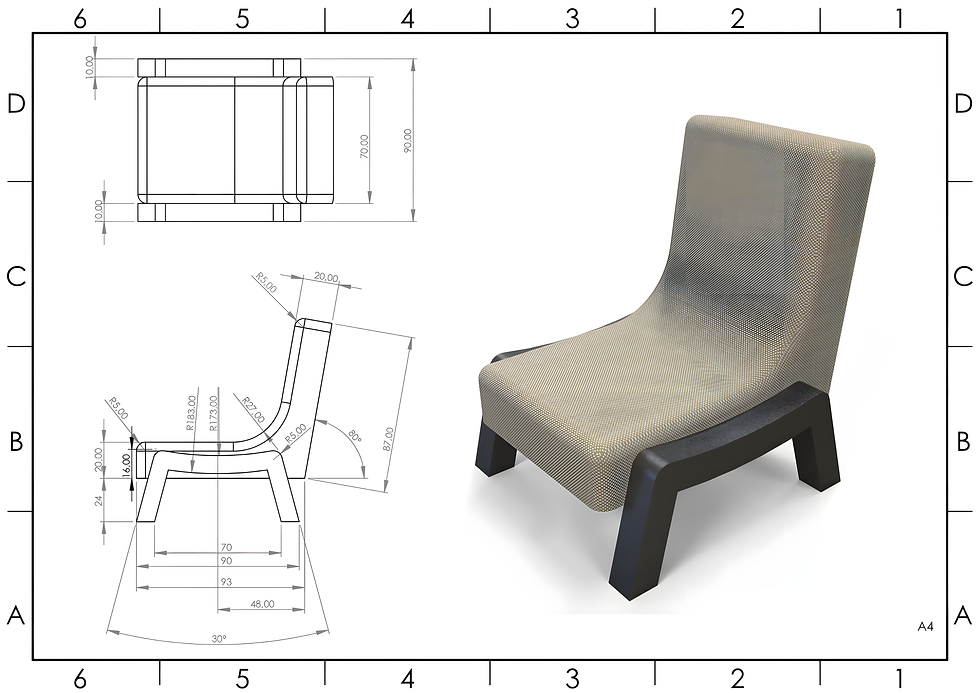
Exercise 84 - 3D practice drawing for all CAD software ( AutoCAD, SolidWorks, 3DS Max, Autodesk Inventor, Fusion 360, CATIA, Creo Parametric, SolidEdge etc.)
Tip: Subscribe to the channel for more tutorials like this.
Tutorial In Autodesk Fusion: https://youtu.be/WNsDnggXDWo


Comments